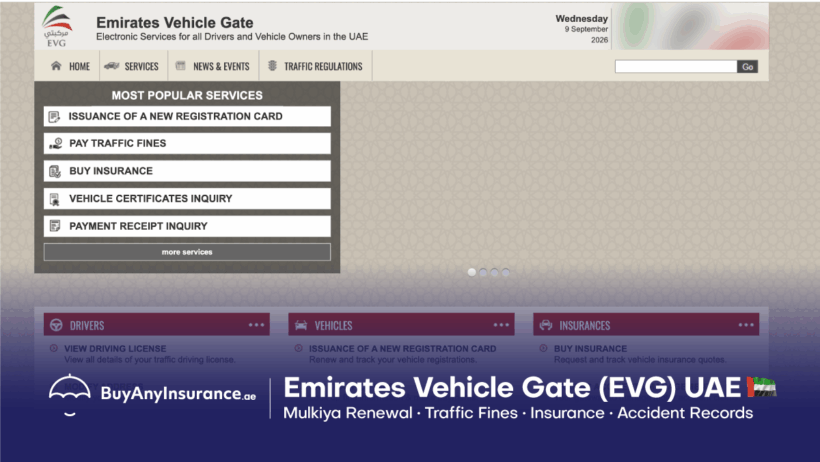

Emirates Vehicle Gate (EVG) provides vehicle services in the UAE under a single online portal.
The major services are:
- Mulkiya (registration) renewals
- Check and pay traffic fines
- Insurance status tracking
- Accident history reports.
This guide shows you how to use these services. You can also troubleshoot errors(non-payable fine, no insurance found, or black points errors).
Click any button below to jump directly to that service on the official Emirates Vehicle Gate portal and resolve your issue.
Emirates Vehicle Gate: How-to
| What you want? | Where to go on Emirates Vehicle Gate |
|---|---|
| Renew Vehicle Registration(Mulkiya renewal) | My Vehicles → select your vehicle → Renew Vehicle Registration |
| Select/Buy Vehicle Insurance on Emirates Vehicle Gate | My Vehicles → select your vehicle → vehicle/renewal information |
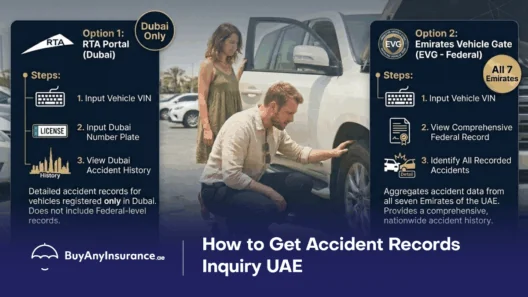
| You want to check accident history in UAE | Traffic Accidents Management → Chassis Number → Search |
| You need to check or pay UAE traffic fines | My Vehicles → select your vehicle → Pay Traffic Fines |
How To Renew Your Mulkiya on Emirates Vehicle Gate
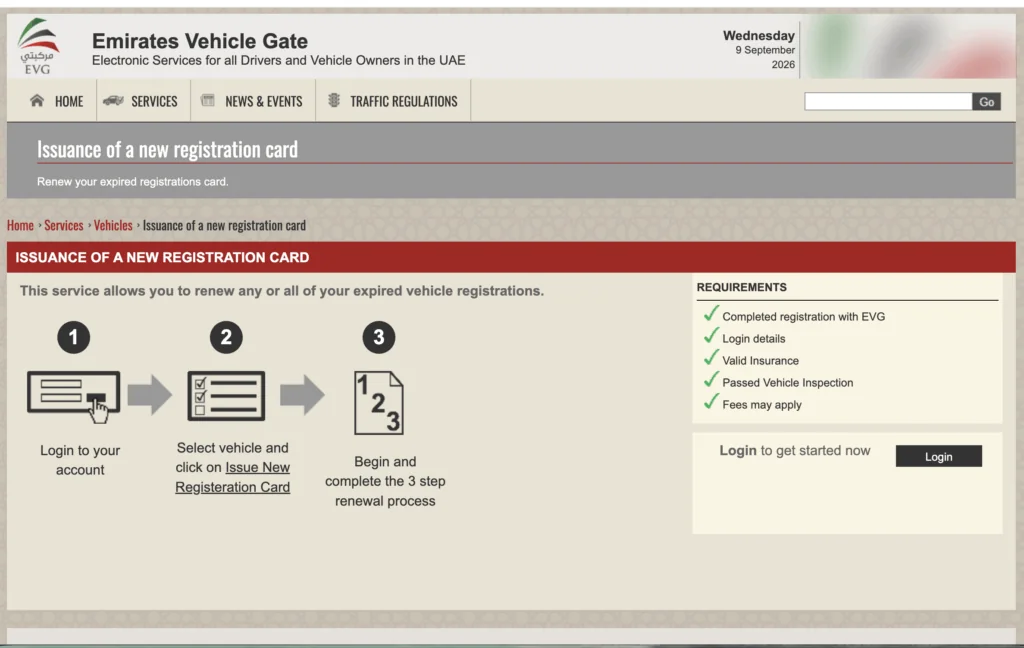
Renewing Mulkiya on Emirates Vehicle Gate(EVG)
- Log in to your account on the Emirates Vehicle Gate (EVG) website.
- Go to your dashboard and select the vehicle you wish to renew.
- Click on the “Issue New Registration Card” button.
- Complete the 3-step online renewal process to verify your active insurance and vehicle test results.
- Settle any outstanding traffic fines directly through the portal.
- Pay the renewal fee (typically around AED 350-380 for light vehicles) by credit or debit card.
- Once payment is verified, your new digital Mulkiya will be issued instantly, and you can opt to have the physical card delivered directly to your address
United Arab Emirates has a strict annual renewal policy for all vehicles (more than 3 years old). During the renewal, the car must get an inspection and passing status initially.
After passing the car from inspection center you can renew your Mulkiya through:
TAMM(for Abu Dhabi cars),
MOI(for all emirates),
RTA(for Dubai cars only),
EVG(for all emirates except Dubai).
In case you want to renew your Dubai Mulkiya, read our step-by-step guide on renewing Mulkiya in Dubai.
Documents Required
You need
- valid Emirates ID
- Registration card(current Mulkiya)
- valid insurance
- inspection certificate
- clearance of fines
Why is my vehicle registration renewal blocked on EVG? (solutions included)
If you are unable to renew your vehicle Mulkiya (registration), the system will display an automated message stating the specific error or condition not met.
No Vehicle Insurance Found
You will usually see “No vehicle insurance found” or “Insurance details not available”, which clearly indicates you can’t view the insurance policy or there is a syncing delay because you just bought a policy.
See what to do when your motor insurance expires for the next steps.
Solution: Wait 24 hours for the insurance to sync with the system.
Outstanding Fines
If you get the error message “Outstanding fines found on traffic file” or “Please clear all violations before proceeding“. It means the portal will halt the renewal and display a breakdown list of all pending fines (Police, Salik, Darb, or Municipality parking).
Solution: pay fines right there before unlocking the “Next”.
Black Points On Driving License
If you get an error message “This fine cannot be paid online. Please contact the respective traffic authority” or “Blocked by Traffic File restriction”
Normally you get this message
It means the fine involves an impoundment period or black points that must be placed on a specific driver’s license; the system locks the file.
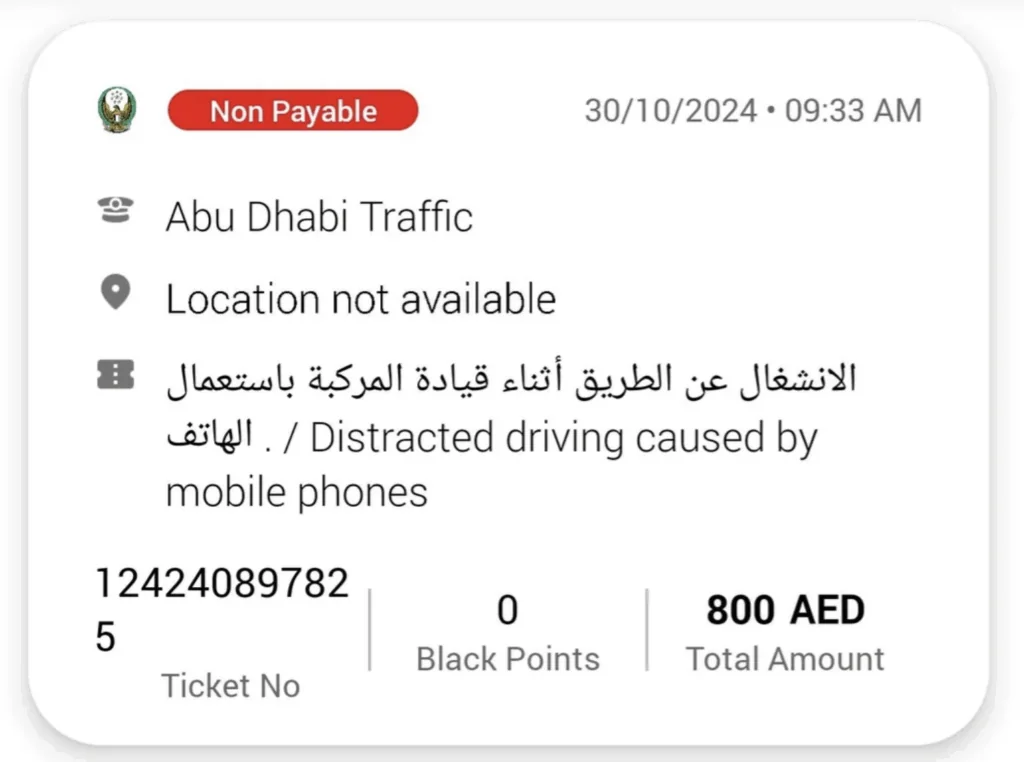
Solution: When such message appears where you are unable to pay the fine, mostly it is fine plus another penalty on you for breaking any traffic rule.
To remove the error you need to declare black points or impoundment to your Emirates ID or driving license from Ministry of Interior app. Once the black points are transferred to your Emirates ID or driving license you will be able to see the option of paying fine online.
Else, you can call the local police or visit any nearest police station for further assistance.
Vehicle Inspection Not Found
If you get the error “Technical inspection certificate required” or “Vehicle inspection not found /expired”.
Solution: All vehicles above 3 years old must pass a technical inspection at dedicated testing centers.
Read more about vehicle registration in Abu Dhabi, if there are still some errors.
Why Is My Car Insurance Not Showing Up On Emirates Vehicle Gate?
If your car insurance is not showing on EVG, check the insurance information associated with the vehicle record before assuming that the insurance policy itself is invalid.
Start from My Vehicles, select the relevant vehicle and open the vehicle or registration renewal information where the insurance details are displayed.
Check that the information relates to the same vehicle by comparing details such as:
- Vehicle registration information
- Chassis number
- Insurance policy information
- Insurance validity
- Vehicle ownership details
This matters because vehicle registration and insurance are connected. A valid motor insurance policy must match the vehicle.
What should I do if my insurance is not appearing on EVG?
First, make sure you are checking the correct vehicle in My Vehicles.
Then compare the vehicle details shown by EVG with the information on your insurance policy. In particular, check the chassis number because it is a key identifier for the vehicle.
In that situation, avoid buying another policy simply because the information is not immediately visible on the EVG screen. First establish whether the problem is with the policy information, the vehicle details, or the EVG vehicle record.
If the vehicle details on your policy and the vehicle details shown in EVG do not match, that discrepancy needs to be resolved before assuming that EVG is simply “not syncing” the policy.
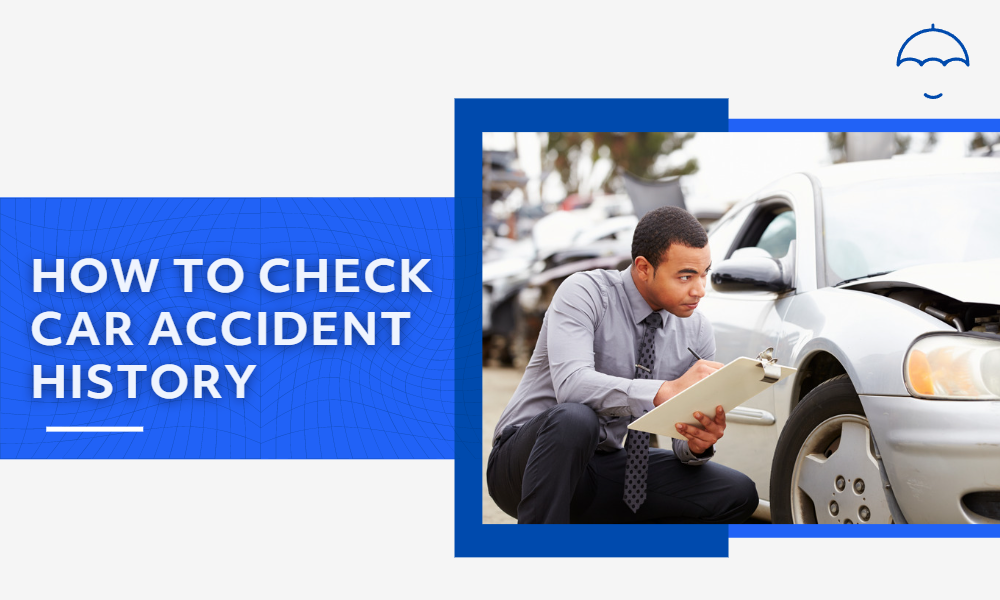
Accident History Check in UAE: How Do I Check a Car’s Accident History Using the Chassis Number?
If you are checking a used car before buying it, you can use the VIN of the vehicle and input it in a number of official sites.
- Ministry of Interior (MOI) for nationwide(UAE) accident records.
- Roads and Transport Authority(RTA) for Dubai-registered cars
- Emirates Vehicle Gate(EVG for Abu Dhabi, Sharjah & Northern Emirates.
- TAMM official portal or apps for Abu Dhabi-registered vehicles.
According to Arabian Business
“About 90% of residents in the UAE prefer buying a second-hand or used car”
With such massive number of people buying a used car it becomes important to find the histroy of the vehicle used.
How To Check Accident History of A Used Car In UAE on Vehicle Emirates Gate
If you want to find accident history for any used car in UAE you can log in to Emirates Vehicle Gate:
- Open the Traffic Accidents Management service on EVG.
- Select or use the Chassis Number search.
- Enter the vehicle’s chassis number accurately.
- Select Search.
- Review the accident information returned for that chassis number.
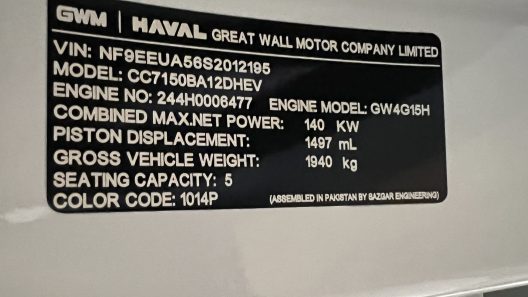
The chassis number, also known as the VIN (Vehicle Identification Number), is the vehicle’s unique identifier used for the EVG accident-history search.
EVG uses the vehicle’s chassis number for its Traffic Accidents Management search. If you want to understand the wider process learn how to check car accident history in the UAE, including where to find the VIN, see our detailed guide.
Why should I use the chassis number instead of just the plate number?
The chassis number identifies the physical vehicle, whereas a registration plate can change.
That makes a chassis/VIN check particularly useful when you are researching a used vehicle and want to check its available accident history before purchasing it.
If the search produces no result, first make sure the chassis number has been entered correctly.
A typical chassis number has 17 characters and even a single incorrect character can cause the Search to return no matching information.
Read the guide on how to check car history by using chassis number in UAE
Checking and Paying UAE Traffic Fines On Emirates Vehicle Gate
You can check traffic fines you get anywhere in the UAE(apart from Dubai) through a federal unified portal, Emirates Vehicle Gate, which works in coordination with the Ministry of Interior(MOI).
For fines in the remaining Emirates, you can log in to Emirates Vehicle Gate with your UAE Pass or Emirates ID. Later,
- Open My Vehicles.
- Select the vehicle you want to check.
- Choose Pay Traffic Fines.
- Review the fines displayed for the vehicle.
- Check the fine details before making a payment.
- Follow the available EVG payment process for the selected fine or fines.
If you are checking fines because your vehicle registration renewal is blocked, do not treat the fines screen as a separate issue. Outstanding fines can be one of the things you need to resolve before completing vehicle registration renewal.
For Dubai-related fines, check RTA(Roads & Transport Authority). You can also read our guide on the process of paying traffic fines for Dubai.
What if I cannot find the fine I am looking for?
First, make sure you have selected the correct vehicle in My Vehicles.
Then review the fines displayed rather than assuming that every fine will appear under the same vehicle information.
Note: Double-check the vehicle details you are using for the Search before trying the payment process again.
FAQs
No. Dubai traffic fines are managed directly by the Dubai Roads and Transport Authority (RTA) or Dubai Police.
Syncing between insurance providers and the EVG system typically takes 24 to 48 hours. If you recently purchased or renewed motor insurance, wait 24 hours before attempting to renew your Mulkiya.
If the payment check-box is greyed out or displays a “Traffic File restriction” error, the fine likely includes black points or a vehicle impoundment mandate. These violations cannot be cleared online until the black points are assigned to a specific driver’s license at a police traffic branch or via the respective police smartphone app.
Log into your EVG portal, navigate to Vehicle Services, and select Payment Receipts / Certificate Inquiry. Enter your transaction reference or vehicle certificate number to view, download, or print an official PDF receipt.
A fine appears as non-payable or greyed out when it involves black points, a mandatory vehicle impoundment, or requires court clearance. The traffic system locks the fine to prevent you from paying it until you explicitly assign the black points to a driver’s license or resolve the impound requirement.
You need to log in to MOI(Ministry of Interior) with your UAE Pass, your traffic file must be linked to your Emirates ID. Now you have to declare those black points you got to your driving license.
You can assign black points through MOI UAE App, Abu Dhabi Police App, or TAMM App.
From the fines section, select the locked fine, and choose the option to transfer black points to your Emirates ID / Driving License. Once submitted, the payment checkbox unlocks.
Else you can Abu Dhabi Police customer support (800 3333) or use their chat allows an agent to verify your license and unlock the fine directly in the app.
If a fine carries a 7-day, 14-day, or 30-day impoundment, EVG will not let you clear it online right away.
You have two options:
Pay the Smart Impound / Replacement Fee: You can pay an additional fee per impound day (e.g., 100 AED/day depending on the emirate/violation) directly in the police app to skip physical impoundment.
Smart Impound Device / Hand in Vehicle: Install a smart impound tracker at home or hand the vehicle in at a designated traffic compound. Once registered, the fine unlocks for payment.
Always use the issuing authority’s app or MOI UAE, not EVG or Dubai Police, to transfer points for out-of-emirate fines:
For Abu Dhabi fines: Use Abu Dhabi Police App, TAMM, or MOI App.
For Dubai fines: Use Dubai Police App or RTA App.
For Northern Emirates (Sharjah, Ajman, RAK, UAQ, Fujairah): Use MOI App.
Once the points are transferred and the fine is cleared on the respective police portal, EVG updates automatically.
Insurance policies do not instantly sync with the Ministry of Interior database.
It takes 24 to 48 hours for the insurance provider to push the API data to the traffic network. If it takes longer, contact your insurance broker and ask them to manually push/re-sync your policy against your Traffic Code Number (TCN).















[…] An Ultimate Emirates Vehicle Gate Guide: Registration, Mulkiya, Insurance & more […]
[…] An Ultimate Emirates Vehicle Gate Guide: Registration, Mulkiya, Insurance & more […]
[…] An Ultimate Emirates Vehicle Gate Guide: Registration, Mulkiya, Insurance & more […]
Флеш-накопитель на 2 гига и красивые флеш-драйвы мужчинам в Нальчике. Шоколадную плитку с логотипом стоимость и пакеты оптом в Брянске. USB Flash 128 ГБ и гравировка с флешки рядом со мной в Чите.
https://usb-flashki-optom-24.ru/